
AI study planning takes your syllabus, exam dates, and available hours and turns them into a personalized, editable schedule with built-in review sessions and milestones. The immediate next step is simple: gather your syllabus, deadlines, and a realistic count of weekly free hours before you open any planner. This guide covers the inputs, the learning science behind good scheduling, sample prompts, safety considerations, and where a tool like Syncronos fits in.
TL;DR:
- Effective AI study planners incorporate memory science principles, such as spacing reviews based on retention intervals, for better long-term recall.
- Tools that explain their scheduling logic and allow user adjustments increase trust and adherence compared to opaque or fixed plans.
- Accurate input gathering—including syllabus details, deadlines, workload estimates, and personal preferences—significantly improves plan usefulness.
- Regular weekly updates and manual interventions are essential for maintaining a realistic and adaptable study schedule throughout the semester.
- Using private or institution-approved platforms and avoiding uploading sensitive course materials helps ensure academic integrity and data privacy.
Table of Contents
- How Does AI Study Planning Actually Work?
- Step-by-Step: Building a Study Plan You'll Actually Follow
- The Learning Science Behind a Good Study Schedule
- Prompts and Inputs That Get You a Usable Plan
- Keeping Your Plan Current Without Starting Over
- Avoiding Privacy and Integrity Problems With AI Planners
- How Syncronos Puts These Principles Into Practice
- What a Semester With an AI Planner Actually Looks Like
- Try Syncronos: Turn Your Syllabus Into a Working Schedule Today
- Primary Sources and Further Reading
- Sources
- FAQ
How Does AI Study Planning Actually Work?
Every AI study planner runs on the same basic pipeline: input, processing, output. Understanding each stage helps you judge whether a tool is doing something smart or just dumping your tasks into a calendar with a nicer interface.
On the input side, you typically feed the system your subjects, syllabus items (readings, problem sets, labs), hard deadlines, weekly available hours, and any personal preferences, like avoiding late-night sessions or protecting Sunday mornings. Some tools accept a syllabus PDF directly; others need you to type or paste the content.
The processing stage is where quality varies most. A good planner breaks large topics into smaller study units, sequences them logically, applies spacing rules between reviews of the same material, and balances your weekly workload so no single day gets overloaded. Weaker tools skip the spacing and sequencing logic entirely and just distribute hours evenly, which looks organized but ignores how memory actually works.
Output formats matter too. Look for:
- Daily or weekly session breakdowns with specific tasks, not just blocked time
- Calendar sync (Google Calendar, Outlook, or iCal export)
- Printable or downloadable summaries for offline reference
- Clear labeling of what each session should produce, like a practice quiz or a set of flashcards
The most important feature to check before committing to any tool is explainability. Research on LLM-driven planning systems shows that students trust and actually use plans more when they can see why a session was scheduled on a given day and adjust it themselves, rather than accepting a black-box output they can't question. A PlanGlow style system that shows its reasoning and lets you edit sessions beats a planner that just hands you a fixed grid.
Step-by-Step: Building a Study Plan You'll Actually Follow
Getting a usable plan out of any AI tool depends more on what you feed it than on which app you pick. Here's the sequence that works.
- Collect your raw inputs. Pull every syllabus item, assignment deadline, and exam date into one place. Estimate your honest weekly available hours, not your ideal ones.
- Set target mastery levels. Decide which topics need deep understanding versus surface familiarity. This tells the planner where to concentrate spacing and review.
- Choose plan type and pacing. A finals-week crunch needs a different rhythm than a 14-week semester plan.
- Define session outputs. Instead of "study chapter 4," specify "complete 15 practice problems" or "write a one-page summary from memory."
- Generate the plan and pilot it for one to two weeks. Treat the first version as a draft, not a commitment.
- Ask the AI to rebalance based on what actually happened. Tell it which sessions you skipped or found too easy, and let it adjust.
Pro Tip: Before you hit generate, write down your three hardest weeks of the term (midterms, project deadlines, any overlap) and flag them for the AI explicitly. Planners handle steady workloads well by default; they need help anticipating collision weeks.
A quick checklist before generating anything: syllabus items entered, deadlines confirmed against the actual course calendar (not memory), weekly hours set at a number you can sustain for a full term, and at least one preference noted (blocked times, preferred subjects for mornings, whatever keeps you consistent). Tools built for syllabus to calendar conversion typically ask for exactly this set of inputs, which is a good sign the underlying logic matches how instructors actually structure a course.

The Learning Science Behind a Good Study Schedule
The best AI planners aren't just calendar generators. They apply decades of memory research most students never learn in school.
Spacing is the biggest lever. Reviewing material once and never again leads to fast forgetting; spacing reviews out at increasing intervals dramatically improves long-term recall. Research on distributed practice found that the ideal gap between study sessions depends on how long you need to remember the material.

Here's the number that should change how you plan: according to research on optimizing retention through distributed practice, spaced review schedules can produce substantially better long-term recall than cramming the same material into back-to-back sessions with no gap at all. A planner worth using should let you set your retention horizon (two weeks for a final versus a full semester for a cumulative course) and adjust spacing intervals accordingly.
Other principles worth checking for:
- Retrieval practice over passive review. Sessions that ask you to produce an answer from memory (practice problems, self-quizzes) beat sessions that just have you reread notes.
- Interleaving. Mixing related topics within a session, rather than mastering one before moving to the next, improves your ability to distinguish between similar concepts on exam day.
- Cognitive load management. Sessions should build in complexity gradually and avoid packing too many new concepts into one sitting.
- Content-aware scheduling. Planners that factor in how difficult a specific topic is, rather than treating all material as equally easy to learn, produce stronger retention. Research on content-aware scheduling algorithms found that systems accounting for item difficulty and response speed outperform fixed, one-size-fits-all schedules.
That last point explains why a generic countdown timer app and an actual AI study planner are not the same product, even if both fill your calendar with study blocks.
Prompts and Inputs That Get You a Usable Plan
If you're working directly with a chatbot instead of a dedicated planner, the quality of your prompt determines the quality of your schedule. Vague prompts get vague plans.
A solid exam-prep prompt includes: exam date, list of chapters or topics with rough weight (how much of the exam each covers), hours available per day, and specific times to avoid. Something like: "I have an exam on May 12 covering chapters 3 through 9, weighted roughly evenly. I have 2 hours on weekdays and 4 on weekends. Don't schedule anything before 9 AM or after 10 PM."
For weak topics, be specific rather than general. "I'm behind on organic chemistry mechanisms" gets a better response than "I'm bad at chemistry."
- Ask directly: "Explain why you scheduled this topic on this day" to force explainability out of the model.
- Request alternate pacing: "Give me an easier version with more review days" or "Compress this into half the time."
- For a two-week exam sprint, specify the compression explicitly rather than letting the AI guess your urgency.
- For a full semester with a part-time job, state your job hours as a fixed constraint, not a preference.
Pro Tip: Detailed, context-rich prompts consistently outperform short ones, according to Duke's guidance on planning with AI. Treat your first prompt as a rough draft and refine it the way you'd revise an essay outline.
Keeping Your Plan Current Without Starting Over
A study plan that never changes is a plan that stops working by week three. Life shifts, deadlines move, and a plan built in August rarely survives contact with October.
- Run a 10-minute weekly reset. Check what you completed, what you skipped, and adjust the coming week. This small habit, according to Duke's academic resource guidance, prevents the kind of plan drift that leads to cramming.
- Let automatic rebalancing handle minor slippage. If you missed one session because of a bad week, let the AI redistribute it.
- Intervene manually for major changes. A new job, a family emergency, or a course drop needs your judgment, not an algorithm's guess.
- Track concrete metrics. Sessions completed versus scheduled, quiz scores over time, and how often you're rescheduling the same task are all signals worth watching.
The 80% load rule helps here: schedule your available hours at roughly 80% capacity, leaving room for the inevitable overrun. A plan built at 100% capacity has zero slack, which means one bad day cascades into a missed week.
Avoiding Privacy and Integrity Problems With AI Planners
Uploading your actual course materials to a public AI model carries real risk, both for your data and for academic integrity. Several universities have issued explicit guidance on this.
Generative AI policies at institutions like USC caution students against uploading restricted or copyrighted course materials to public AI models, recommending institution-approved, secure environments instead. Georgia Tech's policy goes further, requiring disclosure of AI use in academic work in some contexts and emphasizing human oversight before any AI output is treated as final.
Practical safer habits:
- Extract deadlines and structure yourself, then feed only non-sensitive summaries to the AI.
- Use university-provided or private tools for anything containing an instructor's original exam questions, lecture slides, or proprietary readings.
- Check your specific course syllabus and institutional AI policy before uploading anything.
- When in doubt about disclosure, ask the instructor directly rather than assuming silence is permitted.
How Syncronos Puts These Principles Into Practice
Syncronos was built around the exact gap this guide keeps pointing to: most planning tools ignore learning science and offer zero visibility into their own logic.
- Syncronos automates extraction from syllabi and to-do lists, turning raw course documents into a calendar-ready plan without manual data entry, through its syllabus to calendar workflow.
- The system dynamically rebalances deadlines and study blocks whenever your schedule shifts, so a missed session or a moved exam doesn't require rebuilding the whole plan.
- A prioritized dashboard shows exactly what's coming up and why, with sessions you can edit directly rather than accept as fixed.
- The assignment planner feature breaks larger tasks into concrete session outputs instead of vague blocks labeled "study."
For students who want the AI study planner experience described throughout this guide, that combination of automation and editability is the point: less time managing logistics, more time actually studying.
What a Semester With an AI Planner Actually Looks Like
The realistic workflow is generate, pilot, tweak weekly, then ramp up as exams approach. The first plan is never perfect. You'll skip sessions, misjudge how long a reading takes, and need to shift a Sunday block twice before it sticks.
The trade-off worth accepting: a plan you adjust weekly beats a perfect plan you never touch. Students who treat the schedule as fixed tend to abandon it by midterms. Students who spend ten minutes resetting it each week tend to still be using it in finals week, which is when it matters most.
— Syncronos
Try Syncronos: Turn Your Syllabus Into a Working Schedule Today
Syncronos gives you what a blank calendar and a stack of syllabi can't: automatic extraction of every deadline and study block, rebalanced the moment something changes, instead of a plan you have to rebuild by hand every time your schedule shifts.
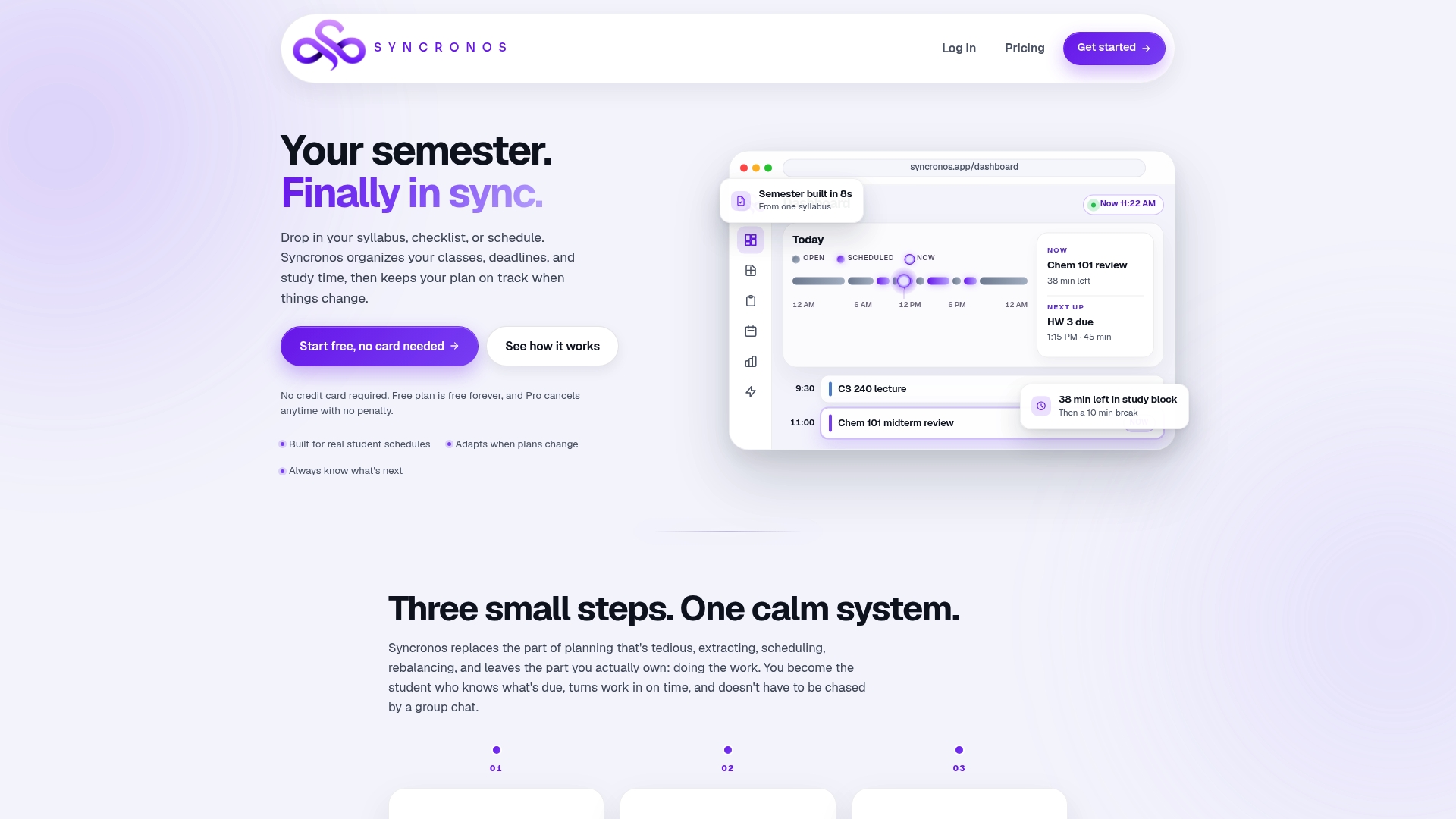
Getting started takes three steps: create an account, upload your syllabus or task list, and let Syncronos generate your first plan. Run the weekly rebalance once your pilot week is done, and adjust sessions directly from the dashboard whenever a deadline moves. The Free plan covers limited manual and AI-powered planning if you want to test the workflow first, while the Monthly plan at $8.99 per month or the Yearly plan at $55.99 per year unlocks unlimited AI schedule generation, optimization, and workload forecasting. Start with the free tier and upload your next syllabus to see how the first plan looks.
Primary Sources and Further Reading
- USC's Generative AI policy covers data protection expectations for uploading course materials.
- Cepeda et al.'s spacing research establishes the retention-interval logic behind session spacing.
- The KAR3L paper on content-aware scheduling explains why difficulty-aware planning beats fixed schedules.
- PlanGlow's research on explainable planning supports the case for controllable, transparent AI tools.
- AtListen offers additional background on adaptive, personalized learning technology.
Sources
- Optimizing retention using distributed practice (Cepeda et al.)
- KAR 3L: content-aware scheduling improves student learning (EMNLP 2024 paper)
- PlanGlow: Personalized study planning with an explainable and controllable LLM-driven system
- USC Generative AI general policy
FAQ
What Is the Best AI Tool for Study Planning?
The strongest options are ones that extract deadlines directly from your syllabus, apply spacing and retrieval practice automatically, and let you see and edit why a session was scheduled. Syncronos handles syllabus extraction and adaptive rebalancing specifically for this use case, though any tool you choose should offer the same explainability.
What Are Good ChatGPT Prompts for Creating a Study Plan?
Give ChatGPT your exam date, chapter list with rough topic weighting, daily available hours, and times to avoid. A prompt like "I have an exam on [date] covering [chapters], with 2 hours on weekdays and 4 on weekends, no sessions before 9 AM" produces a far more usable plan than a general request.
Can I Study With AI Tools for Free?
Yes. Most AI study planners, including Syncronos's Free plan, offer limited manual and AI-powered scheduling at no cost, and general chatbots can generate a basic plan from a well-written prompt at no charge. Free tiers typically cap how many AI-generated schedules or optimizations you get per month.
What App Can I Use to Create a Study Schedule?
Dedicated apps like Syncronos build a schedule directly from your uploaded syllabus and deadlines, while general-purpose AI chatbots can generate a plan from a detailed text prompt. The right choice depends on whether you want automatic syllabus extraction or are comfortable typing out your own inputs each time.
How Often Should I Update My AI-Generated Study Plan?
Run a short weekly reset, ideally under 10 minutes, to reflect completed sessions and shifting deadlines. Let automatic rebalancing absorb small disruptions, but step in manually for major changes like a new job schedule or a dropped course.