

Use an AI syllabus-to-calendar planner to track study progress: extract deadlines from your syllabi, let the system auto-schedule study blocks, monitor a workload heatmap and adherence score, and adjust as your semester shifts. This approach cuts manual planning time and helps you avoid the last-minute cram weeks that come from losing track of what's actually due.
TL;DR:
- Syllabus and Canvas extraction systems correctly structure over 80% of assignments and due dates within 20 to 30 seconds, but accuracy drops with poor document quality.
- The system automatically reallocates study blocks when deadlines shift or plans change, ensuring consistent workload balancing and conflict flagging.
- Schedule adherence of around 80% is typical, but tracking syllabus coverage and workload heatmaps provides early warnings of potential deadline crunches.
- Users should review the heatmap before scheduling, and regularly update their preferences and milestones to keep the plan aligned with actual progress.
- Treat AI planners as collaborating tools, not automatic managers, by manually overriding, reporting errors, and conducting weekly check-ins to maintain control.
Table of Contents
- How AI Syllabus-to-Calendar Planners Track Study Progress
- Set Up Your Semester in 5 Practical Steps
- What Progress Metrics Actually Tell You
- How to Keep Control While the AI Does the Scheduling
- Setting and Adjusting Learning Goals Inside the Plan
- Testing What You Actually Know, Not Just What You Studied
- Building Breaks Into the Schedule Without Losing Momentum
- Reading Your Own Progress Data to Study Smarter
- A Week in the Life of an Adaptive Study Plan
- How Syncronos Helps You Track Study Progress
- Why "Set It and Forget It" Misses the Point
- Sources
How AI Syllabus-to-Calendar Planners Track Study Progress
The process starts with parsing. You upload a syllabus PDF or connect a Canvas import, and the system reads through the document to pull out assignment titles, due dates, exam dates, and grading weights. This is the same extraction problem document-processing software has tackled for years, applied specifically to academic paperwork that rarely follows a consistent format.
Accuracy varies by document quality, but structured testing on this exact workflow found that syllabus and Canvas extraction produced usable calendars with more than 80% of assignments and dates correctly structured. Processing typically finished in 20 to 30 seconds for a scanned or typed syllabus, and 4 to 10 seconds for a direct Canvas import.
Pro Tip: Scanned syllabi with tables or unusual date formats (like "Week 7, Thurs" instead of an actual date) are the most common source of parsing errors. Always spot-check the first import before trusting the auto-generated calendar.
Once tasks are extracted, the planner has to decide when you'll actually work on them. This is a constraint-solving problem: the system weighs your available hours, deadline proximity, and stated preferences, then allocates study blocks that fit around your existing commitments. Because full timetabling is a combinatorial problem, most systems rely on metaheuristic and multi-objective optimization rather than a single perfect calculation, trading off hard constraints like due dates against soft ones like your preferred study times.
What separates a good planner from a static calendar app is adaptive rebalancing. When a deadline moves, a class gets canceled, or you miss a session, the schedule doesn't just leave a hole. It redistributes the remaining workload across your available time, which is the core reason this category exists in the first place:
- Extracts tasks and dates from syllabi and Canvas
- Allocates study blocks around your real availability
- Reshuffles blocks automatically when plans change
- Flags conflicts instead of silently overwriting them
Set Up Your Semester in 5 Practical Steps
Getting from a folder of syllabi to a working semester plan takes less effort than most students expect, provided you follow the setup in order rather than skipping straight to the calendar view.
- Gather your inputs. Collect every syllabus PDF, Canvas course link, and any assignment descriptions with sub-deadlines (a lab report due in three parts, for instance). Add personal deadlines too, like a scholarship application or a part-time work schedule.
- Upload and validate. Import everything, then scan the parsed list before accepting it. Look for missing dates, duplicated entries, and multi-part assignments that got flattened into one line.
- Set your preferences. Enter your daily availability windows, preferred session length, and which exams or projects should get priority if the calendar gets tight.
- Run the auto-schedule and review the heatmap. Check the semester view for clusters of red or overloaded weeks. If a major project lands in the same week as two exams, manually pull the project start date earlier.
- Turn on calendar sync and adaptive rebalancing. Set your notification preferences, then put a recurring 10 minute weekly check-in on your own calendar to confirm the plan still matches reality.
Pro Tip: Do step 4 before you do anything else with the calendar. Reviewing the heatmap first catches scheduling conflicts while they're still easy to fix, rather than after you've already built habits around a broken plan.
What Progress Metrics Actually Tell You
Three numbers matter more than any others in an AI planner: schedule adherence, syllabus coverage, and the shape of your workload heatmap.
Schedule adherence measures how many of your planned study blocks you actually completed. An 80% adherence rate is solid, but it's a signal to look closer, not just a number to celebrate. If you're consistently skipping evening blocks, that's a preference mismatch, not a discipline failure, and it's worth adjusting your availability settings rather than pushing through.
Syllabus coverage tracks what percentage of the semester's material you've worked through relative to where you should be by that calendar week. A 30-student evaluation of this kind of system found weekly syllabus coverage rose from 61.2% to 88.4% over four weeks, alongside 82.1% schedule adherence and a 34.7% drop in reported academic stress. Coverage that's falling behind the calendar's expectation is your earliest warning that a deadline crunch is coming.
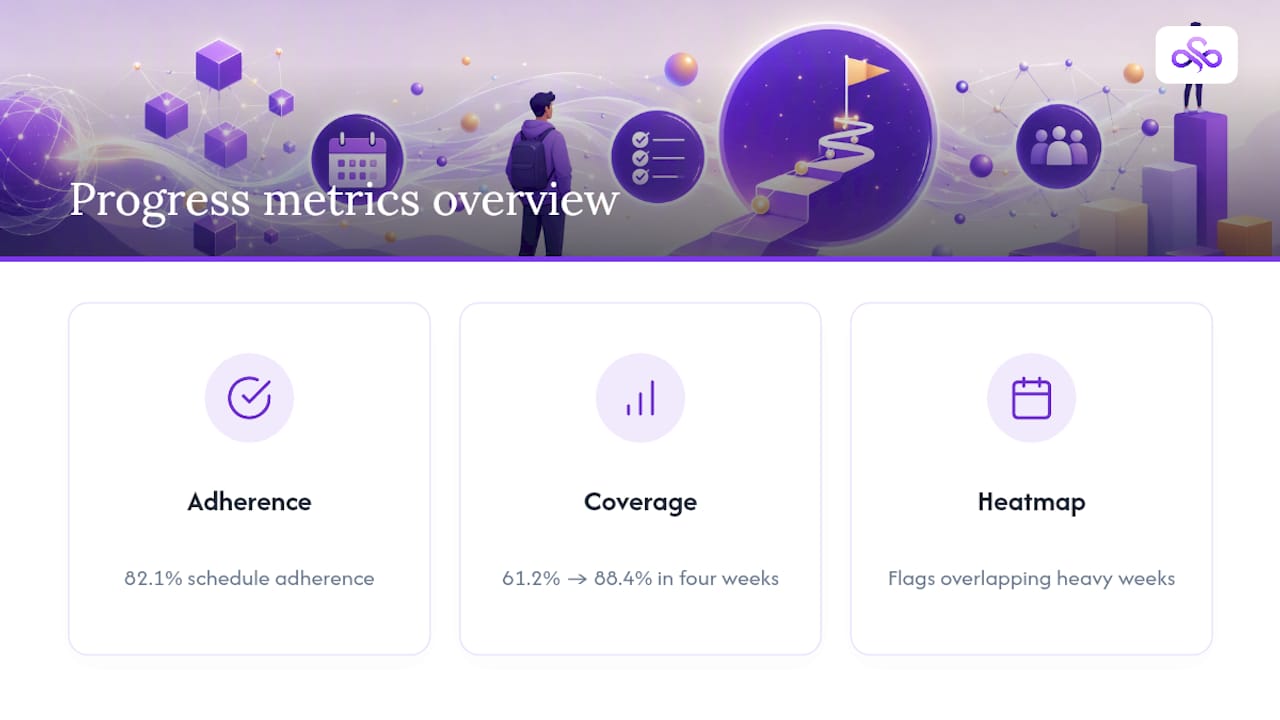
Heatmap clusters are the visual layer that ties both metrics together. A run of dark red weeks means overlapping deadlines, and the fix is almost always the same: front-load long projects into lighter weeks nearby rather than trying to survive the heavy week as scheduled. This kind of workload density visualization tends to trigger earlier planning in ways a plain to-do list rarely does, because the density is visible at a glance instead of buried in a list of dates.
When any of these metrics dips, most planners offer catch-up suggestions, like compressing lighter study blocks or shifting a review session earlier. Accept the ones that fit your energy level; edit or reject the ones that don't.
How to Keep Control While the AI Does the Scheduling
An AI planner should function as a collaborator, not an authority you follow blindly. Researchers who study these systems describe them as governance infrastructures, meaning they quietly shape what gets prioritized and when. Tools work best when students can contest the system's logic rather than accepting every suggestion at face value.
In practice, that means using conversational adjustments instead of manually rebuilding your calendar. Telling the planner "move review sessions to mornings" or "give the thesis chapter priority this week" lets it reallocate blocks around your actual energy and obligations.
- Override the schedule when a deadline is genuinely ambiguous, a group project has conflicting availability, or an instructor gives verbal instructions that never made it into the syllabus.
- Run a 10 to 15 minute weekly review to confirm parsed items are still accurate and to approve or reject rebalanced blocks.
- Avoid the two most common failure modes: accepting every auto-schedule without question, or ignoring a parsing error because fixing it feels like extra work.
Pro Tip: If the same assignment keeps getting misread week after week, don't just correct it silently. Report it or flag it in the app so the parsing model has a chance to improve on similar formats later.
Setting and Adjusting Learning Goals Inside the Plan
Deadlines tell you what's due. Goals tell you what "on track" actually means for you personally, and the two aren't the same thing.
Start with milestones that sit above the task level: "understand thermodynamics well enough to explain it without notes" rather than "read chapter 6." Attach each milestone to a rough date on your semester calendar, ideally a week or two before the related exam or paper, so you have buffer room if the goal takes longer than expected.
Review milestones on the same cadence as your weekly planner check-in. If you're hitting every study block but the underlying skill isn't developing, that's a goal-calibration problem, not a scheduling one. Adjust the milestone date, break it into smaller sub-goals, or add a self-testing block specifically aimed at the gap.
Treat goals as living targets. A milestone set in week 2 based on a syllabus outline often needs revision by week 6, once you know your actual pace in that course. The mistake most students make is setting a goal once and never revisiting it, which turns a useful target into a source of guilt instead of direction.
Testing What You Actually Know, Not Just What You Studied
Time spent on a subject and mastery of that subject are not the same measurement, and confusing them is one of the most common planning errors.
Low-stakes self-testing closes that gap. Practice problems pulled from past exams, flashcard tools like Anki or Quizlet, and the classic technique of closing your notes and writing a cold summary from memory all force retrieval instead of recognition. Recognition is what happens when you reread notes and feel familiar with them. Retrieval is what happens on the actual test, and it's a different skill.
Build a short self-assessment into your schedule at the end of each major topic block, not just before the exam. A 15 minute quiz after finishing a unit tells you immediately whether the material stuck, while there's still time to schedule a review block before it compounds into exam-week panic.
Compare self-test results against your syllabus coverage metric. If coverage says you're on pace but your quiz scores are dropping, the schedule is working and your study method isn't. That's worth fixing before you add more hours, since more time spent on an ineffective method just produces more hours of ineffective studying.
Building Breaks Into the Schedule Without Losing Momentum
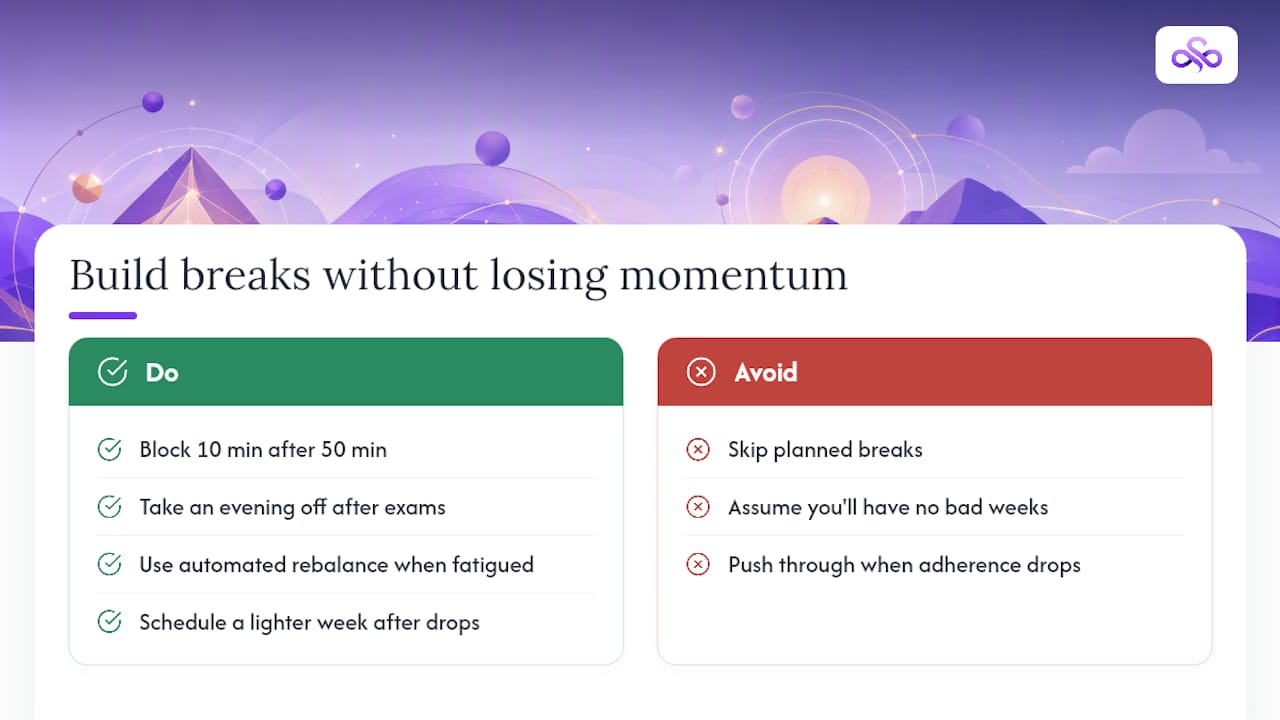
Breaks that get skipped are the single most predictable cause of a schedule falling apart by midterms. A plan with no recovery time isn't an efficient plan. It's a plan that assumes you'll never have a bad week, which every semester eventually produces.
Structured break patterns work better than ad hoc rest. Blocking 10 minutes after every 50 minute study session, and a full evening off after a heavy exam week, keeps fatigue from accumulating in ways that quietly reduce how much you retain. Automated scheduling research on constraint-heavy academic calendars found that handling the allocation decisions automatically reduces cognitive load compared to students manually juggling every trade-off themselves, which frees up mental bandwidth specifically for recovery decisions instead of scheduling ones.
Watch for burnout signals in your own adherence data: a sudden drop in completed sessions after several high-adherence weeks usually means fatigue, not laziness. The right response is to schedule a lighter week deliberately, not to push through and hope adherence recovers on its own. Most planners can accept a rebalance instruction like "reduce load this week" without abandoning the rest of the semester plan.
Reading Your Own Progress Data to Study Smarter
Raw data doesn't improve your studying. Interpreting it correctly does.
Look for patterns across weeks rather than reacting to any single day. If adherence drops every Thursday, that's a scheduling conflict with something recurring, like a shift at work or a lab section, not a motivation problem you need to push through. Fix the calendar, not your willpower.
Cross-reference three signals together: adherence percentage, syllabus coverage, and self-test scores. High adherence with low coverage suggests your sessions are running long on easy material and short on hard material. High coverage with falling test scores suggests you're moving too fast without checking retention. Both patterns call for different fixes, and neither shows up if you only look at one metric in isolation.
Set a monthly review, separate from your weekly check-in, to look at the trend line rather than the week-to-week noise. A single rough week means little. Three consecutive weeks of declining adherence or coverage means the plan itself needs a structural adjustment, not just another pep talk.
A Week in the Life of an Adaptive Study Plan
Picture the heatmap lighting up dark red three weeks out, a chemistry midterm stacked against a paper deadline neither of which had felt urgent yet. A quick message to the planner, "push the paper's research phase earlier, keep exam review in the mornings," and the blocks quietly rearrange themselves.
The project work that used to get crammed into the night before now spreads across four calmer sessions. Nothing about the underlying workload changed. What changed was seeing it early enough to redistribute, and trusting the adjustment enough to actually follow it instead of white-knuckling through the original plan.
How Syncronos Helps You Track Study Progress
Syncronos is built specifically for the workflow this article just walked through: upload a syllabus, and it extracts assignments, exams, and due dates directly into a semester calendar. From there, the adaptive rebalancing engine adjusts your study blocks automatically when a deadline shifts or a session gets missed, so you're not manually rebuilding your week every time your schedule changes.
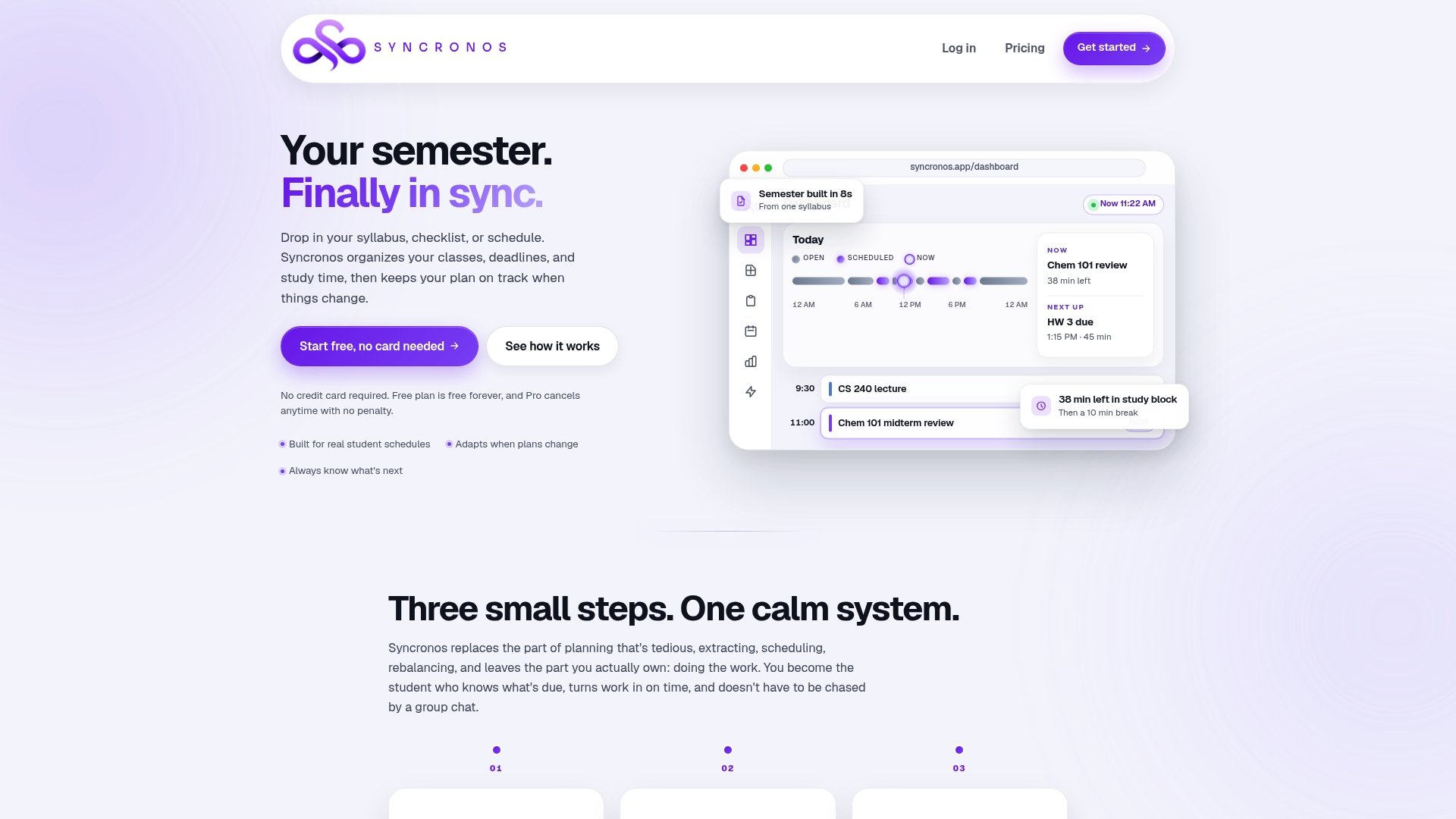
The dashboard gives you a prioritized view of what's due, a workload heatmap for spotting overloaded weeks before they hit, and an adherence score that tells you whether your plan is actually holding up. For exam periods specifically, the exam study planner lets you flag priority tests so review blocks get scheduled with enough runway.
Uploading one syllabus is enough to see how the syllabus-to-calendar conversion works. Within a couple of minutes, you'll have a semester view and heatmap built from your actual course load, plus a free-tier look at how the assignment planner keeps individual tasks visible without extra manual entry. Check the pricing page if you want to compare what the free tier covers against the unlimited AI scheduling in the paid plan.
Why "Set It and Forget It" Misses the Point
The biggest misconception about AI study planners is that automation means disengagement. It doesn't, and treating it that way is where students get burned. The research on this category is consistent on one point: these systems work best as co-pilots you can question, not autopilots you switch on and ignore.
What most guides underplay is how much the heatmap itself changes behavior, independent of any scheduling algorithm underneath it. Seeing three heavy weeks stacked together does something a to-do list never manages: it makes the trade-off visible before it becomes a crisis. That's arguably a bigger contributor to reduced stress than the optimization math running in the background.
The other underrated piece is the weekly check-in. It sounds like busywork, but skipping it is exactly how a good schedule quietly drifts out of sync with reality, one uncorrected parsing error or one ignored rebalance suggestion at a time. Ten minutes a week is a small price for a plan that still reflects your actual semester by week ten instead of the syllabus as it looked in week one.
— Syncronos
Sources
- Dynamic Schedule Planner: Automated Workload Balancing via Syllabus and Canvas Extraction; The Algorithmic Advisor in Higher Education
- Using Boolean Satisfiability Solvers to Help Reduce Cognitive Load and Improve Decision Making when Creating Common Academic Schedules
- Algorithmic advisor and governance infrastructures in education