

The most reliable weekly study schedule is a balanced template with fixed commitments blocked first, hardest subjects assigned to your peak-energy hours, and 20% of study time left open as buffer. Start today with a 10-minute time audit and lock in your non-negotiables before you plan a single study session. Tools like Syncronos can pull deadlines straight from your syllabi if you'd rather skip the manual setup.
TL;DR:
- Map your energy peaks and schedule your hardest subjects during times when you feel most alert to maximize retention and efficiency.
- Use 50 to 60-minute sessions with short breaks for sustained focus, and interleave different subjects to improve overall understanding.
- Protect your non-negotiable commitments first, then allocate study hours accordingly, adjusting for difficulty and your strongest subject areas.
- Conduct weekly reviews that compare planned versus actual study hours to identify and address consistent shortfalls or scheduling issues.
- Employ adaptive scheduling tools like Syncronos to automatically rebalance your plan when deadlines shift or life disruptions occur.
Table of Contents
- How Do You Create a Weekly Study Schedule Step by Step?
- How Many Hours Should You Study Each Week?
- Copyable Weekly Templates You Can Start With Today
- Keeping the Schedule Working Week After Week
- What To Do When Your Weekly Plan Falls Apart
- Syncronos's Take on Schedules That Survive Real Life
- Generate Your Weekly Schedule Instead of Building It by Hand
- Sources
How Do You Create a Weekly Study Schedule Step by Step?
A working study timetable follows a sequence, not a guess. Skip a step and the whole plan tends to fall apart by Wednesday.
- Audit your current week. For one week, jot down where your hours actually go, class time, commute, meals, scrolling, sleep. Most students discover two to four hours of "hidden time" between classes that could absorb short review sessions, a pattern Cornell's Learning Strategies Center points to directly.
- List every task, then break it down. "Study for biology" is not a task. "Review chapters 4 and 5 flashcards" is. Split large assignments into pieces you can estimate in 30 to 90-minute chunks.
- Pad every estimate. People routinely underguess how long work takes, a bias psychologists call the planning fallacy. If a task feels like it needs an hour, schedule 75 minutes.
- Block fixed commitments first. Classes, work shifts, sleep, and meals go on the calendar before a single study block does. These are non-negotiable anchors.
- Assign peak-energy blocks to your hardest subjects. Once anchors are set, drop your most demanding coursework into the mental windows where you're sharpest, not whatever slot happens to be empty.
- Time-block with intent, and interleave. Instead of one long stretch on one class, alternate subjects across the week. Write a one-line goal for every block, "finish problem set 3, questions 1 to 8," not just a subject name.
- Close the week with a short review. Ten to fifteen minutes on Sunday to check what got done, what didn't, and why.
This sequence mirrors the five-step method Athenify recommends: audit, map energy, block commitments, assign subjects, add buffer. It works because each step depends on the one before it. You can't map energy before you know your commitments, and you can't estimate hours before you've broken tasks into pieces small enough to time.
How Many Hours Should You Study Each Week?
The starting rule of thumb is 2 to 3 hours of study per credit hour, a guideline Oregon State's Academic Success Center uses across its advising work. A 15-credit course load lands you somewhere between 30 and 45 weekly study hours before adjusting for difficulty. A tough organic chemistry course might need the high end; a course you're acing already can sit lower.
Pro Tip: If your calculated hours exceed the time you actually have available, don't shrink every subject equally. Cut review time on your strongest classes first and protect the hours going to your weakest one.
Energy mapping matters as much as hour count. Notice when you think clearly, mid-morning for some people, late evening for others, and reserve that window for your hardest subject rather than whatever is due soonest.
- Study sessions of 50 to 60 minutes with 10 to 15 minute breaks sustain focus better than marathon blocks, a pattern backed by productivity research on session length.
- Pomodoro-style 25-minute sprints work well for reading-heavy or repetitive tasks.
- Interleaving subjects instead of massing one topic for hours improves long-term retention.
Copyable Weekly Templates You Can Start With Today
You don't need a custom system on week one. Pick the template that matches where you are and adjust from there.
- Starter plan (habit-building): Four days a week, 20 to 30 minutes each, same time slot. The goal is consistency, not coverage.
- Balanced semester template: Study sessions distributed across five to six days, hardest subject in your peak window, one dedicated review block, and a Sunday planning slot.
- Exam-intense template: Longer blocks for one to two weeks maximum, with a built-in recovery day afterward. Sustained overload without a reset tends to backfire.
| Time Block | Monday | Wednesday | Friday |
|---|---|---|---|
| — | Fixed: class | Fixed: class | Fixed: class |
| — | Peak block: hardest subject | Peak block: hardest subject | Buffer/catch-up |
| — | Interleaved review | Fixed: work shift | Interleaved review |
| — | Buffer slot | Light review | Weekly planning (Sun. equivalent) |
Printable weekly grids with a daily priority line and one catch-up block, a structure GlobalEdPath's planner uses, work well if you'd rather fill something by hand each Sunday than build digitally.
Keeping the Schedule Working Week After Week
A schedule that isn't reviewed decays fast. The fix is a short, repeatable check-in, not a full rebuild.
Run this weekly review in 10 to 15 minutes:
- Compare planned hours against actual hours for each subject.
- Flag any block that got skipped twice in a row, that's your real problem area, not whatever feels urgent.
- Move next week's hardest task into your best energy window if it wasn't there this week.
- Check whether your buffer got used. If it's gone every week, you're underestimating something.
The single metric worth tracking is planned versus actual hours per subject. Everything else, apps, colored calendars, streak counters, is secondary to that one comparison. When a subject consistently runs over, the fix usually isn't "try harder." It's one of three things: add more buffer around it, make the session goal more concrete, or move it to a better time slot.
Pro Tip: When motivation is at zero, commit to just 10 minutes. Most resistance lives in starting, not continuing, and a 10-minute session almost always turns into more once you're moving.
What To Do When Your Weekly Plan Falls Apart
Every student's week gets derailed eventually. A pop quiz gets rescheduled, a shift changes, a group project meeting eats your peak block. The plan itself isn't the problem, treating it as fixed instead of adjustable is.
When a disruption hits, don't try to cram the missed session back into the same day. Move it to your buffer slot first. That's exactly what 20% of unscheduled time exists for, and if you've been protecting it instead of quietly filling it with "just one more thing," you'll have room to absorb the hit without pushing everything else.
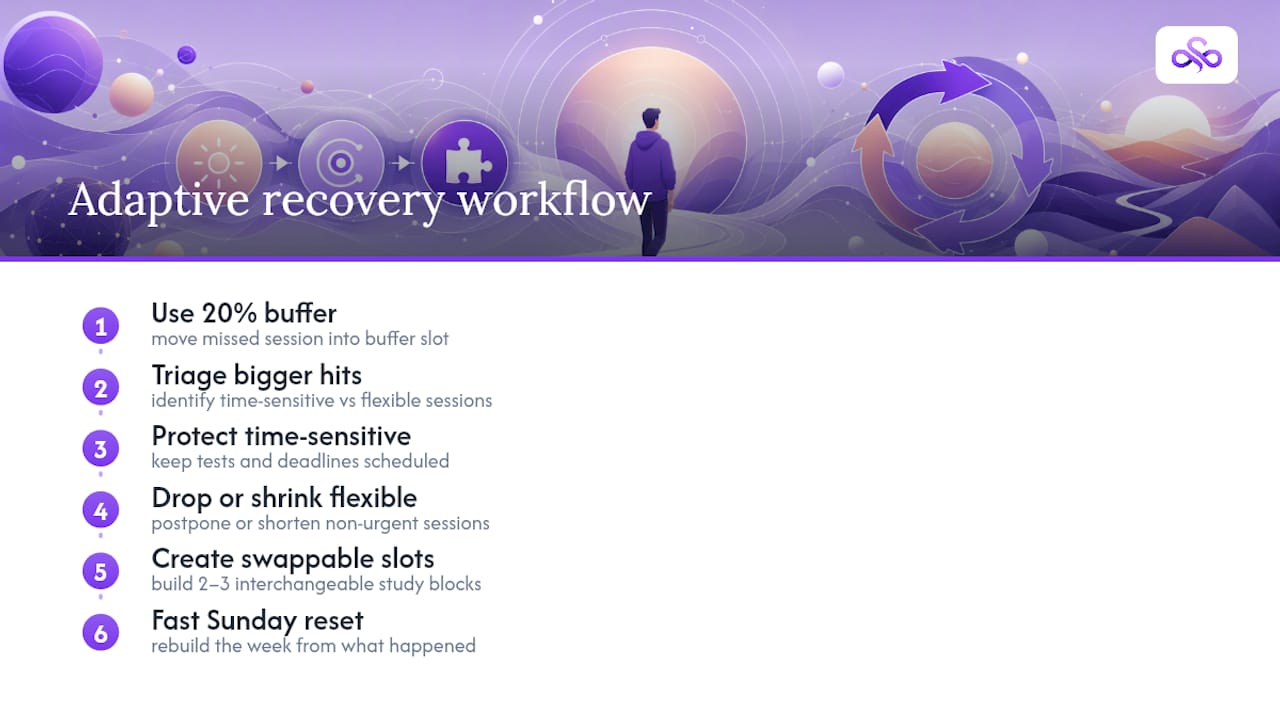
If a disruption is bigger, an illness, a family event, a week with three exams stacked together, don't try to preserve the full week's plan. Triage instead. Ask which sessions are truly time-sensitive (a test in two days) versus which can slide (reviewing a chapter you won't need for three weeks). Protect the former, drop or shrink the latter.
Recurring disruptions deserve a different fix than one-off ones. If your work schedule shifts every week or your commute varies, don't rebuild your plan from scratch each time, build a flexible template with two or three swappable slots instead of one rigid grid. That way a shift change moves one block instead of unraveling the whole week.
The habit that saves most schedules isn't perfect planning. It's a fast Sunday reset that asks "what actually happened," and rebuilds from there rather than from the version of the week you hoped for.
Syncronos's Take on Schedules That Survive Real Life
Most weekly schedules break the moment life stops cooperating, a deadline moves, a class gets canceled, an assignment turns out to be bigger than expected. Syncronos was built around that exact failure point. When a syllabus changes or a due date shifts, the schedule rebalances the surrounding study blocks automatically instead of leaving the student to manually reshuffle everything by hand.
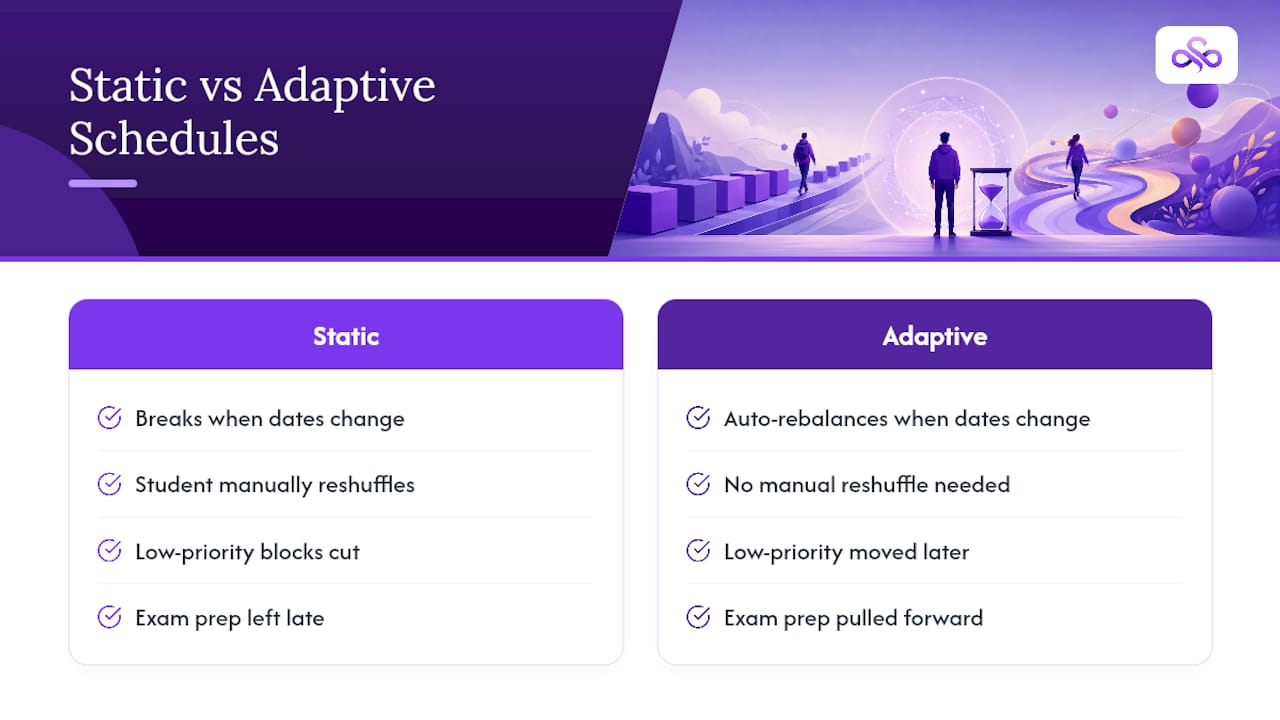
Picture a student whose professor moves a midterm up by four days. A static planner leaves that student scrambling to figure out what to cut. Adaptive scheduling instead shifts lower-priority review blocks later in the week and pulls exam prep forward into the freed peak-energy slots, without the student opening a spreadsheet.
The templates and rules in this guide work. Syncronos just removes the manual labor of applying them every time your week changes.
— Syncronos
Generate Your Weekly Schedule Instead of Building It by Hand
Every step in this guide, the time audit, the task breakdown, the buffer math, is exactly what Syncronos automates. Upload a syllabus or a to-do list and Syncronos extracts deadlines and assignments, auto-generates a calendar around your fixed commitments, and rebalances study blocks the moment a due date moves or a class gets rescheduled.
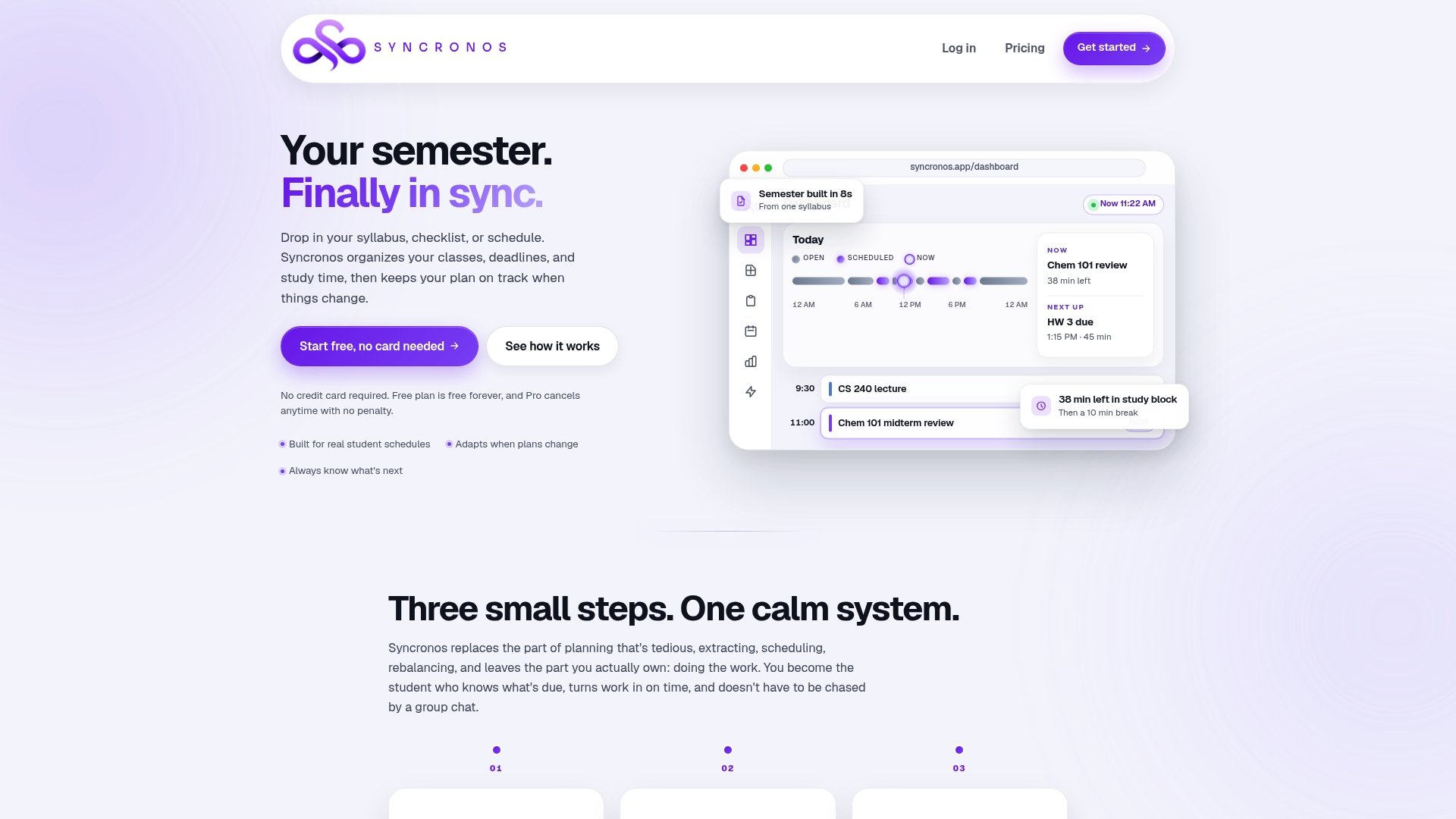
Instead of rebuilding your grid every time a plan changes, you get a prioritized, always-current view of what's due and when to work on it. Students juggling multiple courses use it to break large assignments into scheduled sessions automatically through the assignment planner, rather than estimating task time by hand every Sunday. If exams are close, the exam study planner compresses the same principles into a short-term intensive template.
Try the free tier and generate your first weekly schedule from an existing syllabus at Syncronos.
Sources
- Guidelines for Creating a Study Schedule – Learning Strategies Center (Cornell)
- Strategies for Creating an Effective Weekly Schedule – Academic Success Center (Oregon State)
- How to Create a Study Schedule (5-Step Method That Works) – Athenify
- How to Create a Study Schedule (That You'll Actually Stick To) | Notesmakr